Final Post


Artist’s Statement:

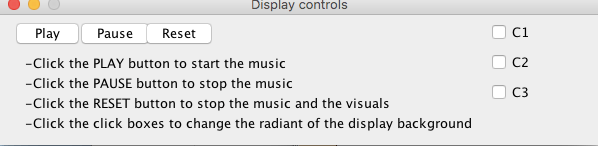
Differing slightly from our original plan, our program allows the user to see a visual representation of a note on a display (as well a hear the actual note) when you play it on a midi keyboard. Our program uses the qualities of the note to determine its color, and position on the display. Additionally, our program includes a GUI control panel so that the user can restart their display with ease.

Our program acts as a way for users to better understand and interpret the music that they are creating. By both hearing and seeing musical creations, we can better interpret them.

Users Guide:

  • Open the program in Jython Environment for Music and press play.
  • Press Play on the user control panel
  • Select your current midi controller from the drop-down list
  • Enjoy the program!
  • When you are ready for a blank canvas, press restart on the control panel

Code Repository

Errata:

While no features of our final program are broken, we are not entirely satisfied with our latency issue. There is a slight delay between when the button on the midi keyboard is pressed and when the note sounds/shape appears. This latency gets progressively worse as more shapes are added to the display.  This is likely because the information of each note is run through several different functions before its final return is made.

With little to no knowledge on programming efficiency, we did not know how to fix this.

Another issue we are experiencing is the playback of notes. If the user presses 3 keys at once on the midi controller, the program will play back the notes separately and they sound at different times. This is likely due to the lack of threading in our program. Since it is only able to process one note at a time, the notes play one at a time.

Occasionally, an individual graphic will have a glitch and disappear from the display.
 

Demonstration Video


Getting the final code ready

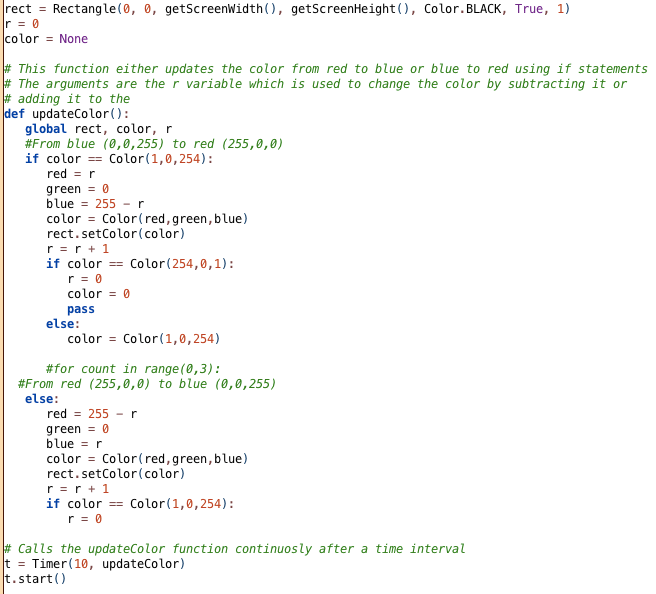
This week we have been mainly working on removing any bugs and getting our final submission ready. One thing that was clearly an issue was the latency in our program. Ben recommended revising the gradient function so that it only used timers rather than time.sleep. This was somewhat difficult as the structure of the function did not work with timers. I re-wrote the function like this:


from gui import *
from timer import *
d = Display("Gradient", 300, 300)
rect = Rectangle(0, 0, 300, 300, Color.BLACK, True, 1)
d.add(rect,0,0)
r = 0
color =None
# This function either updates the color from red to blue or blue to red using if statements
# The arguments are the r variable which is used to change the color by subtracting it or
# adding it to the
def updateColor():
global rect, color, r
#From blue (0,0,255) to red (255,0,0)
if color == Color(1,0,254):
red = r
green = 0
blue = 255 – r
color = Color(red,green,blue)
rect.setColor(color)
r = r + 1
if color == Color(254,0,1):
r = 0
color = 0
pass
else:
color = Color(1,0,254)
#for count in range(0,3):
#From red (255,0,0) to blue (0,0,255)
else:
red = 255 – r
green = 0
blue = r
color = Color(red,green,blue)
rect.setColor(color)
r = r + 1
if color == Color(1,0,254):
r = 0
# Calls the updateColor function continuosly after a time interval
t = Timer(10, updateColor)
t.start()

view raw

Faster Gradient

hosted with ❤ by GitHub

I think this will run somewhat fast but our program still has considerable latency when a note is played. I do not think we have the time or ability to make this program run faster.

One of our stretch goals was to run an animated gradient on each shape on the display, however, based on how the program is currently running, I think it will have even more delay if we were to add this feature.

Regardless, we are nearing completion and our program is doing what we expected it to.

Wrapping it up

We met one final time in the library today and added everything together. The code works and we are able to draw images on the screen based on the notes we played. We encountered many setbacks and roadblocks during this project but we overcame them as a group and feel confident to present it in class tomorrow. I learned a lot about JEM doing this project and want to continue to expand my coding skills by further coding with it.

Updates..

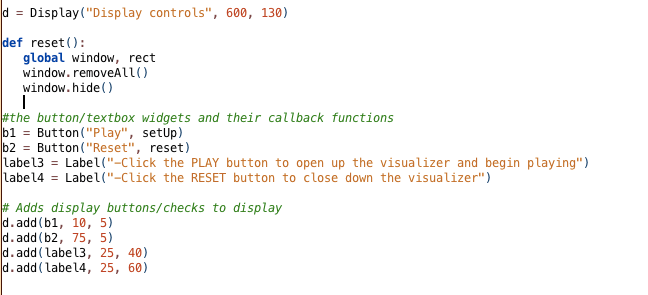
I had other ideas for the control panel that was not able to implement and therefore had to change. First I wanted the “play” button to bring up the visualizer just as a blank screen. I then wanted to use the different checkboxes to add different gradients to the blank visualizer screen as backgrounds. The code for the different gradients was not working so we decided that we would just use a one gradient background that is brought up by the “play” button by calling the setUp function that I made. The reset button will use the function reset which will hide and remove the window from the screen. We also fixed the problem that was causing JEM to crash when the play button was pushed. We had to use timer instead of sleep. Attached below is the new gradient code and controller code.

Screen Shot 2018-12-11 at 6.30.02 PM

_______________

Screen Shot 2018-12-11 at 6.25.33 PM

Getting a Final Version Going


We all spent this weekend working on different aspects of the project and had time to reconvene during class and combine our code into a final product. This code combines my shapes that get called by midi notes played on a keyboard,


def drawShape(eventType, channel, data1, data2):
global window, shape1, shape2, shape3, shape4, shape5, shape6
# iicon position is random
x = randint(0, getScreenWidth()) # x may be anywhere on display
y = randint(0, getScreenHeight()) # y may be anywhere on display
colors = ["Red", "Orange", "Yellow", "Green", "Blue", "Purple", "Pink", "White", "Teal"]
colorIdx = (data1 / 2) % len(colors)
color = colors[colorIdx]
shapeLists = [shape1, shape2, shape3, shape4, shape5, shape6]
shapeListIdx = (data1 / 3) % len(shapeLists)
shapeList = shapeLists[shapeListIdx]
shape = shapeList[color]
icon = Icon(shape,x,y)
window.add(icon)
# play note
Play.noteOn(data1, data2)
# establish a connection to an input MIDI device
midiIn = MidiIn("Unknown Vendor Oxygen 25")
# register a callback function to process incoming MIDI events
midiIn.onNoteOn(drawShape)

view raw

My shapes

hosted with ❤ by GitHub

Owen’s color gradient background,


from gui import *
from timer import *
import time
b = True
def updateColor(shape):
while b:
for count in range(0,3):
#From red (255,0,0) to blue (0,0,255)
for i in range(0,255):
red = 255 – i
green = 0
blue = i
color = Color(red,green,blue)
shape.setColor(color)
time.sleep(0.01)
if color == Color(1,0,254):
#From blue (0,0,255) to red (255,0,0)
for i in range(0,255):
red = i
green = 0
blue = 255 – i
color = Color(red,green,blue)
shape.setColor(color)
time.sleep(0.01)

view raw

Owen Gradient

hosted with ❤ by GitHub

and Tenny’s setup funciton.


def setUp():
global window
window = Display("Visualizer", getScreenWidth(), getScreenHeight())
gradient = Rectangle(0, 0, getScreenWidth(), getScreenHeight(), Color.BLACK, True, 1)
window.add(gradient)
updateColor(gradient)
#input: None
#return: the width of the screen
def getScreenWidth():
return Toolkit.getDefaultToolkit().getScreenSize().width
#input: none
#return: the height of the screen
def getScreenHeight():
return Toolkit.getDefaultToolkit().getScreenSize().height

view raw

Tenny Setup

hosted with ❤ by GitHub

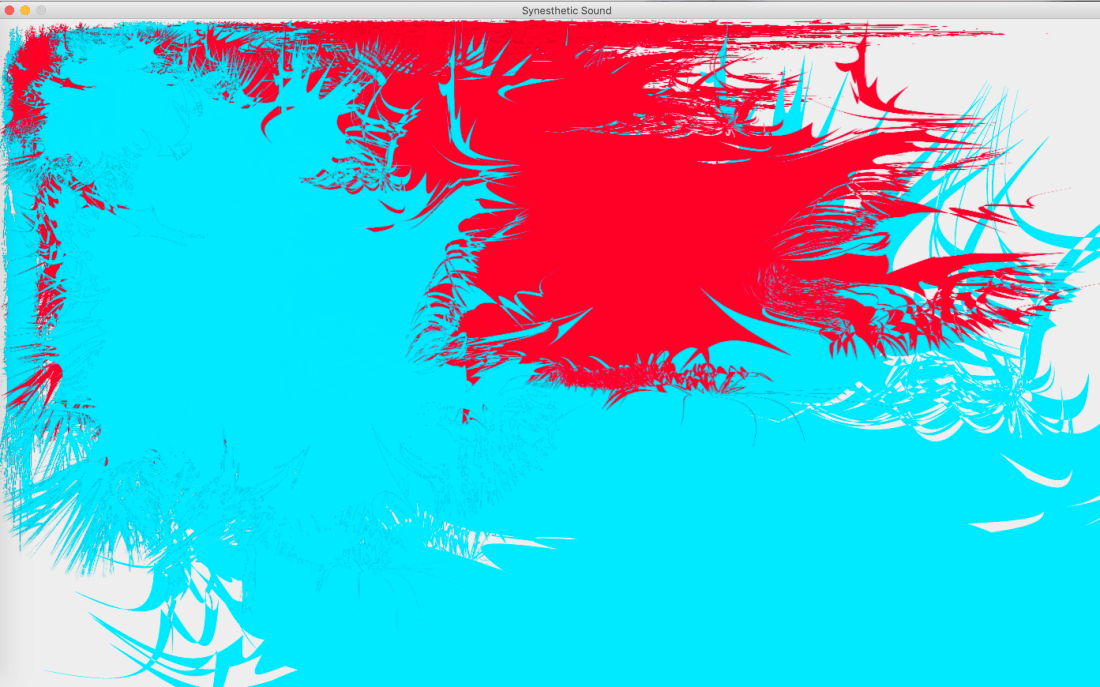
This code does everything we want it to do,  now it’s just time to refine our final project into something we’re excited to present. Currently, the visualizer looks like this:

Screen Shot 2018-12-10 at 3.04.12 PM.png

The color splashes get added (different shapes and colors depending on the note) when the keyboard is played, and the gradient in the background transitions between blue and red. These next few days we are going to be putting the finishing touches on the project by creating a “clear” function, changing the way the timer works so it hopefully is less buggy, and trying to get the color splashes to animate by rotating. We are meeting tomorrow to hopefully get these finishing touches worked out!


New Shapes


I had a lot of time on my hands this weekend and so I spent a lot of time getting our program up and running. I had originally designed some shapes for the program based on what my own synesthesia looks like. I then made many color variations of these shapes and wrote some code so that they would change color and or shape depending on the note played and then would put it on the screen.


colors = ["Red", "Orange", "Yellow", "Green", "Blue", "Pink", "White", "Turqoise"]
colorIdx = (data / 2) % 12
color = colors[colorIdx]
shapeLists = [Shape1, Shape2, Shape3, Shape4, Shape5, Shape6, Shape7]
shapeListIdx = data / 12
shapeList = shapeLists[shapeListIdx]
shape = shapeList[color]

view raw

color changing

hosted with ❤ by GitHub

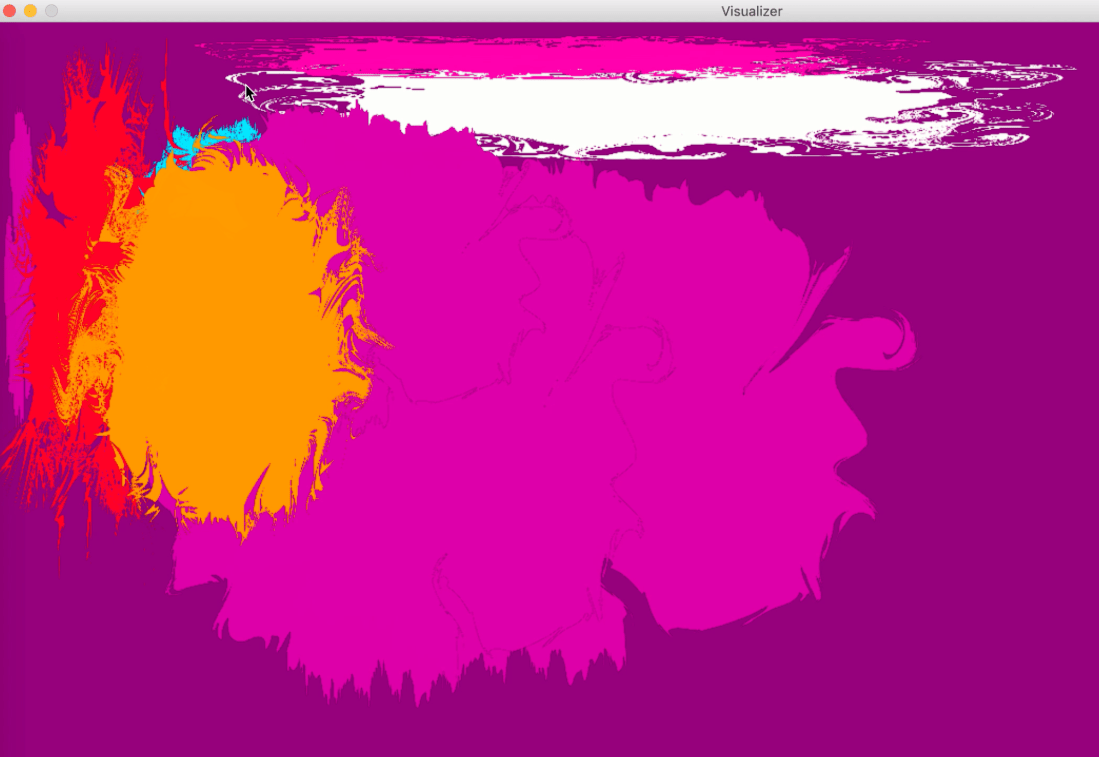
This code worked, however, I was very unhappy with the visuals of it. The end result turned out something like this:

Screen Shot 2018-12-09 at 1.06.55 PM.png

Because of this outcome, I’ve decided to go back to the drawing board with the shapes and try to come up with something cleaner. Overall I think we’re in a very good spot to get the project done.


Tweaking the project

After we all met in lab on Friday we decided that loading a midi note into the program was not going to work. There is no way we can load the midi file into the program and have it read and draw shapes at the same time. We were going use a virtual DAW (Digital Audio Workstation) but decided the best way to achieve our goal is to use a physical midi keyboard. We will use  ( midi device).onNoteOn( function) and play the notes in real time.

New developments

This week, we have made some changes to what we expect our final program to do. Our biggest issue was playing back a midi file and simultaneously calling a drawShape() function. The MIDI library has a function: ( *midi device*).onNoteOn( *function*) which calls a function whenever a note is played on a midi controller. The issue is that we intended our program to do this but with a midi file. The main issue surrounding this is dealing with rests in the midi file (we didn’t want our program to ignore rests). The one possibly feasible solution to this is to find a way to have a Digital Audio Workstation set up to output to our program as if it was a midi controller. I’m not entirely sure this is possible. I have reached out to the Apple Logic Pro X to determine if this is doable. In the meantime, we are changing the goal of this program to be more of an aid to live performance. It will create the displays in real time as someone plays on a midi keyboard.

One of the main functions I worked on this week is an animated color gradient. This will be the background of our display.


def updateColor(shape):
while b:
for count in range(0,3):
#From red (255,0,0) to blue (0,0,255)
for i in range(0,255):
red = 255 – i
green = 0
blue = i
color = Color(red,green,blue)
shape.setColor(color)
time.sleep(0.01)
if color == Color(1,0,254):
#From blue (0,0,255) to red (255,0,0)
for i in range(0,255):
red = i
green = 0
blue = 255 – i
color = Color(red,green,blue)
shape.setColor(color)
time.sleep(0.01)

A stretch goal for this function would be to have it update from side to side so that it has a more dynamic look.

Additionally, I have been working on putting together our setUp() function.

At this point, I feel like the completion of this program is realistic and within our ability. From here on we need to devise the main function that will modify and add our graphics to the display.

The week continues…

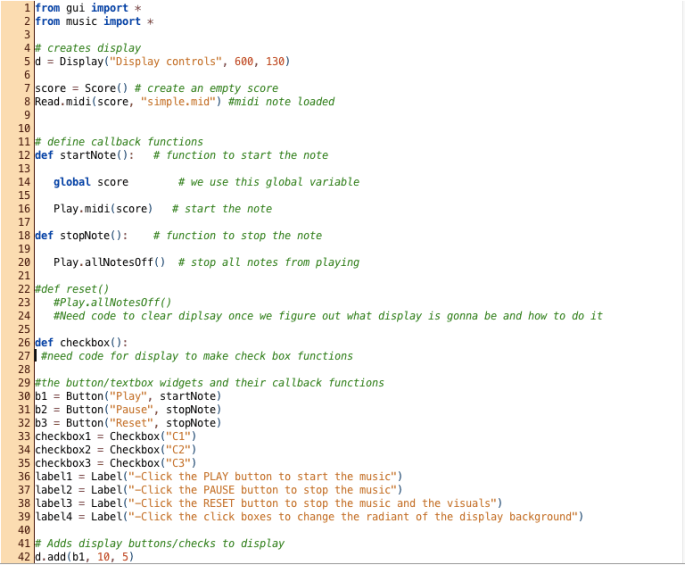
We still can’t find out how to break the midi files down into notes so that the program can read a certain note and display the visual that goes with it. Owen and I met with Tanner on Wednesday after class and got some ideas on how to achieve what we want to do but we still couldn’t accomplish it. He did help us figure out the code for a changing gradient background that we want to have to play behind our visuals. The gradient code is not final but we only have a little more to add. I have written code for a controller display box that we are going to use to start/stop the music and visuals. The checkboxes will be used to load three different gradient backgrounds on the display once we figure out the final code. Not all of the code is written for the controller yet since I have to wait for the gradient code and the code for the display before I can finalize the functions that affect them. For the rest of the week, we are going to try and figure out how to make the note’s characteristics readable by the program so we can attach certain visual attributes to them. If we can not figure it out we may move to a different idea. We will use a midi keyboard to play live music instead and have those notes affect the type of visuals the program user sees.

Screen Shot 2018-12-07 at 9.33.50 AMScreen Shot 2018-12-07 at 9.33.58 AM

_________________________

Screen Shot 2018-12-07 at 9.34.30 AM

Blockers

Currently, our group has a few blocks that are preventing us from continuing on the JEM portion of our project. Mainly, the midi library has a function onNoteOn( *function* ) that is calls a function whenever a midi note is played. The problem is that this does not accept a midi file as input. I suspect that there is a simple solution for this (and will be working with Tanner on this later today). If a function that calls a function for each note in a midi file does not exist, there is a potential work around that would involve looping through each note of the note list, calling a function to make a graphic, the pausing the loop for the duration of the note. If a simpler option exists, it will likely run quicker than this loop.

In the mean time, I have written two pieces code pertaining to the graphics. The first determines what note is being read, and from that choses what shape the note will represent.


def shapeChoice(shapeVar):
shape = getNote(note)
def getNote(note):
shape = none
noteValue = none
pitch = note.getPitch()
if pitch in (0,12,24,36,48):
noteValue = c
if pitch in (1,13,25,37,49):
noteValue = db
if pitch in (2,14,26,38,50):
noteValue = d
if pitch in (3,15,27,39,51,63,75,87,99,111,123):
noteValue = eb
if pitch in (4,16,28,40,52,64,76,88,100,112,124):
noteValue = e
if pitch in (5,17,29,41,53,65,77,89,101,113,125):
noteValue = f
if pitch in (6,18,30,42,54,66,78,90,102,114,126):
noteValue = gb
if pitch in (7,19,31,43,55,67,79,91,103,115,127):
noteValue = g
if pitch in (8,20,32,44,56,68,80,92,104,116):
noteValue = ab
if pitch in (9,21,33,45,57,69,81,93,105,117):
noteValue = a
if pitch in (10,22,34,46,58,70,82,94,106,118):
noteValue = bb
if pitch in (11,23,35,47,59,71,83,95,107,119):
noteValue = b
if noteValue in (c,eb,gb,a):
shape = square
if noteValue in (db,e,g,bb):
shape = square
if noteValue in (d,f,ab,b):
shape = pentagon
return shape

view raw

Shape Choice

hosted with ❤ by GitHub

Additionally I found a method of making a gradient of colors and choosing a color based on the pitch of a note. The function works with any color combination but for this example we will say it goes from red to blue. This function will align the lowest note to red and the highest note to blue. Any notes in between will be assigned a color proportional to their distance from either end of the gradient.


colors = []
def getColor(note):
import colorsys
for i in range(101):
rgb = colorsys.hsv_to_rgb(i / 300., 1.0, 1.0)
colors.append(i, [round(255*x) for x in rgb])

view raw

Color Gradient

hosted with ❤ by GitHub

One goal I would like to achieve would be making the background an animated gradient. This background would smoothly shift between two colors when a note of certain parameters is played.