Sorting Notes and Graphics


Since we’ve gotten midi files to load into JEM and have been able to pull note information out of those midi files, I’ve started trying to make some functions that will put different graphics on the screen based on what note is playing. I started off doing this by making dictionaries of notes. When you get the pitch of a note from a midi file with JEM it spits back out a number that corresponds to a certain note. I grouped all of these numbers into note values (A, B, C, etc.) so that we would be able to group the graphics more simply.


#dictonaries of notes
a = [9,21,33,45,57,69,81,93,105,117]
aS = [10,22,34,46,58,70,82,94,106,118]
aF = [8,20,32,44,56,68,80,92,104,116]
b = [11,23,35,47,59,71,83,95,107,119]
bS =[12,24,36,48,72,84,96,108,120]
c = [0,12,24,36,48,72,84,96,108,120]
cS = [1,13,25,37,49,61,73,85,97,109,121]
d = [26,38,50,62,74,86,98,110,122]
dS = [3,15,27,39,51,63,75,87,99,111,123]
e = [4,16,28,40,52,64,76,88,100,112,124]
eF = [3,15,27,39,51,63,75,87,99,111,123]
f = [5,17,29,41,53,65,77,89,101,113,125]
fS = [6,18,30,42,54,66,78,90,102,114,126]
fF = [4,16,28,40,52,64,76,88,100,112,124]
g = [7,19,31,43,55,67,79,91,103,115,127]
gS = [8,20,32,44,56,68,80,92,104,116]
gF = [6,18,30,42,54,66,78,90,102,114,126]

I then used the getNotes function that my team worked on in lab to get the pitch values of notes and then wrote another function which takes in a note as input and then uses if statements to see which note dictionary each pitch is in, and displays a corresponding graphic on the screen.


# Loops through the score, part, and phrase to make a list of all the notes
def getNotes():
global parts, notes, phrases, score
parts = score.getPartList()
for part in parts:
for phrase in part.getPhraseList():
phrases.append(phrase)
for note in phrase.getNoteList():
notes.append(note)
d = note.getDuration()
# Prints all the notes and their attributes
return notes
def noteImage(note):
global notes
for note in notes:
note.getPitch()
if note in a:
#put in this graphic and draw to screen
elif note in aS:
#put in this graphic and draw to screen
elif note in aF:
#etc..
elif note in b:
elif note in bS:
elif note in c:
elif note in cS:
elif note in d:
elif note in dS:
elif note in e:
elif note in eF:
elif note in f:
elif note in fS:
elif note in fF:
elif note in g:
elif note in gS:
else:

As you can see, the code is not fully fleshed out. We are still deciding as a group if we want to generate the graphics randomly with the GUI library, or if we want to do the graphics in Illustrator and then just put it on the screen depending on what the note is. I’m going to work on that next, and once we decide how we want to do the graphics I’m going to work on filling out and debugging this code.
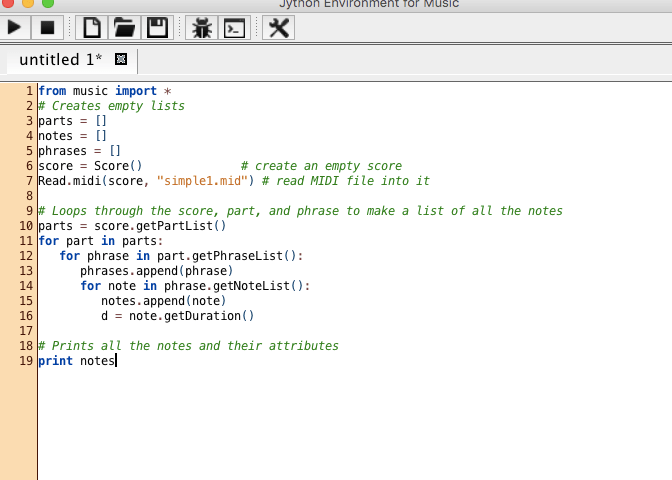


Start of the next week

Screen Shot 2018-12-03 at 11.18.28 AM

In lab, we overcame the roadblocks we had when we first started the project. We figured out that many of the old functions we used in JES that we couldn’t find in JEM were not needed at all. For example, pickAFile wasn’t needed to pick a midi note to play because we could just load the midi file with read.midi(score, “midi note here”). I also finally got a midi note to play in JEM which will now allow me to create my own midi notes and test them in the program. I am working on that right now. We also started to write the code in order to break down and parse the note. We will take characteristics of the midi note such as duration, type of note, and pitch and assign them to create certain shapes visually. The picture attached shows the code written in the steps explained above.

Questions for Lab


I think it’s safe to say that the biggest hurdle in getting our final project up and running at this point is understanding how the Jython Environment for Music works. Since we’ve been using JES this whole semester, it is slightly daunting not having the safe functions available to us as we did before. For the lab, we could use help understanding how to import midi files and how to get information out of them using JEM. We could also use help in starting to set up a dictionary of note values so that we can assign different visuals to them.


The first two days

The last two days I have been figuring out how JEM works. I spent most of my time familiarizing myself with the program and trying to figure out how to play a midi note through the program. I did not end up figuring out how to actually play a note but have done a lot of research on the Jython music site. I believe with all of the research my group and I have done that we will be able to play a note by lab tomorrow. While doing my research my  I realized that many JES commands do not work in JEM. I started trying to figure out how to get the commands working or if there is a way around it. My group and I will figure out all of our roadblocks tomorrow and will be able to move forward. I am going to start complaining midi notes to create the song we will use when I finally figure out how to play the notes in JEM.


Preparation

Today and yesterday, I have been working on familiarizing myself with JEM. JEM has many useful features, however, several questions have surfaced in this process. Mainly, JEM does not have the same standard library that JES does so I was having difficulty using simple functions that we have used all year. I suspect that the solution may be as simple as importing a library. I will solve this tomorrow in lab.

Because I could not figure out how to import files, I was not successful in playing a midi file in JEM, however, I have researched it on the Jython Music website and feel confident on how it can be done.

I suspect the next big hurdle will be figuring out how to create a dictionary of the notes. The plan of our program is to assign values for the qualities of each midi note, which will require a dictionary of notes.

Learning about JEM

In order to begin my work in JEM in accessing midi files and generating the respective visual effects, I decided that I first needed to understand how JEM works and what skills and techniques from JES crossover with it. So, my first step was looking through the Jython Music Library. I realized that this library would contain many useful information pertaining to our project in particular, specifically music import functions. So I did my research on MIDI constants like pitch and duration. I looked up on how dynamics on notes work and how we can measure the dynamics of midi files and use that information to make our visualizations respond effectively.

Window Setup

This is the first bit of work I’ve done on the project and it’s pretty simple but you have to start somewhere! I just started off by importing the GUI and then using it to create a setup function that creates a window the size of the screen where the display will eventually be. I started off with this because I’m still learning how to use JEM and how to play with midi files, but I wanted to get a start on something. I pulled this code directly from my data visualization lab because I knew it would do what I needed and I’m lazy and don’t like to re-type things.  I’ve been working on getting a midi file to upload and play in JEM but so far I haven’t figured it out. We’re hoping to get help from Kenzie on that tomorrow so that we can move onto getting data from midi files that we can use to make visuals.


import os
import gui
from gui import *
#input: none
#return: the width of the screen
def getScreenWidth():
return Toolkit.getDefaultToolkit().getScreenSize().width
#input: none
#return: the height of the screen
def getScreenHeight():
return Toolkit.getDefaultToolkit().getScreenSize().height
#input: none
#return: none
#sets up the display
def setup():
window = Display("Synesthetic Sound", getScreenWidth(), getScreenHeight())
setup()

Project Introduction


Artist’s statement:

As an avid concert go-er and music listener, I speak from my personal preference to say that music is more enjoyable when there are synchronous motion graphics. The problem is that most music listeners do not have access to professional software that does this. Our program will be simple, user friendly, and allow music listeners to have a concert like experience on demand. As waveform analysis seems to be a quite daunting task, our program will run off of midi files. While the user will not be able to chose any mp3 file, the use of midi files will allow our program to be precise with note and beat alignment.

Our program will consist of 2 displays. One being the main display which will show the motion graphics, and the other being the control panel. The control panel will be a simple display with several options that will modify the graphics as well as a play and pause button.

Work schedule:

We plan to meet up at 1 p.m. on Thursdays, for 2 hours, and again on the weekends if necessary.

What we need to learn:

While some understanding of how midi files work will be necessary, a bulk of the work of this project will depend on learning how to use Jython Environment for Music. This is necessary for the use of midi files and playback. Additionally, we will need to better our understanding of graphics and how to make them change size, color, etc in a smooth and pleasing manner.

Our Team Members:

  • Calvin Ritger
  • Owen Grace
  • Sidd Nair
  • Tenny McFarlane

Tenny and I have some experience in with music production and processing; we will be able to teach Sidd and Calvin on this aspect of the project. We will all have learning to do on the rest of the code.


Stay Tuned!