Final Post


Artist’s Statement:

Differing slightly from our original plan, our program allows the user to see a visual representation of a note on a display (as well a hear the actual note) when you play it on a midi keyboard. Our program uses the qualities of the note to determine its color, and position on the display. Additionally, our program includes a GUI control panel so that the user can restart their display with ease.

Our program acts as a way for users to better understand and interpret the music that they are creating. By both hearing and seeing musical creations, we can better interpret them.

Users Guide:

  • Open the program in Jython Environment for Music and press play.
  • Press Play on the user control panel
  • Select your current midi controller from the drop-down list
  • Enjoy the program!
  • When you are ready for a blank canvas, press restart on the control panel

Code Repository

Errata:

While no features of our final program are broken, we are not entirely satisfied with our latency issue. There is a slight delay between when the button on the midi keyboard is pressed and when the note sounds/shape appears. This latency gets progressively worse as more shapes are added to the display.  This is likely because the information of each note is run through several different functions before its final return is made.

With little to no knowledge on programming efficiency, we did not know how to fix this.

Another issue we are experiencing is the playback of notes. If the user presses 3 keys at once on the midi controller, the program will play back the notes separately and they sound at different times. This is likely due to the lack of threading in our program. Since it is only able to process one note at a time, the notes play one at a time.

Occasionally, an individual graphic will have a glitch and disappear from the display.
 

Demonstration Video


Getting a Final Version Going


We all spent this weekend working on different aspects of the project and had time to reconvene during class and combine our code into a final product. This code combines my shapes that get called by midi notes played on a keyboard,


def drawShape(eventType, channel, data1, data2):
global window, shape1, shape2, shape3, shape4, shape5, shape6
# iicon position is random
x = randint(0, getScreenWidth()) # x may be anywhere on display
y = randint(0, getScreenHeight()) # y may be anywhere on display
colors = ["Red", "Orange", "Yellow", "Green", "Blue", "Purple", "Pink", "White", "Teal"]
colorIdx = (data1 / 2) % len(colors)
color = colors[colorIdx]
shapeLists = [shape1, shape2, shape3, shape4, shape5, shape6]
shapeListIdx = (data1 / 3) % len(shapeLists)
shapeList = shapeLists[shapeListIdx]
shape = shapeList[color]
icon = Icon(shape,x,y)
window.add(icon)
# play note
Play.noteOn(data1, data2)
# establish a connection to an input MIDI device
midiIn = MidiIn("Unknown Vendor Oxygen 25")
# register a callback function to process incoming MIDI events
midiIn.onNoteOn(drawShape)

view raw

My shapes

hosted with ❤ by GitHub

Owen’s color gradient background,


from gui import *
from timer import *
import time
b = True
def updateColor(shape):
while b:
for count in range(0,3):
#From red (255,0,0) to blue (0,0,255)
for i in range(0,255):
red = 255 – i
green = 0
blue = i
color = Color(red,green,blue)
shape.setColor(color)
time.sleep(0.01)
if color == Color(1,0,254):
#From blue (0,0,255) to red (255,0,0)
for i in range(0,255):
red = i
green = 0
blue = 255 – i
color = Color(red,green,blue)
shape.setColor(color)
time.sleep(0.01)

view raw

Owen Gradient

hosted with ❤ by GitHub

and Tenny’s setup funciton.


def setUp():
global window
window = Display("Visualizer", getScreenWidth(), getScreenHeight())
gradient = Rectangle(0, 0, getScreenWidth(), getScreenHeight(), Color.BLACK, True, 1)
window.add(gradient)
updateColor(gradient)
#input: None
#return: the width of the screen
def getScreenWidth():
return Toolkit.getDefaultToolkit().getScreenSize().width
#input: none
#return: the height of the screen
def getScreenHeight():
return Toolkit.getDefaultToolkit().getScreenSize().height

view raw

Tenny Setup

hosted with ❤ by GitHub

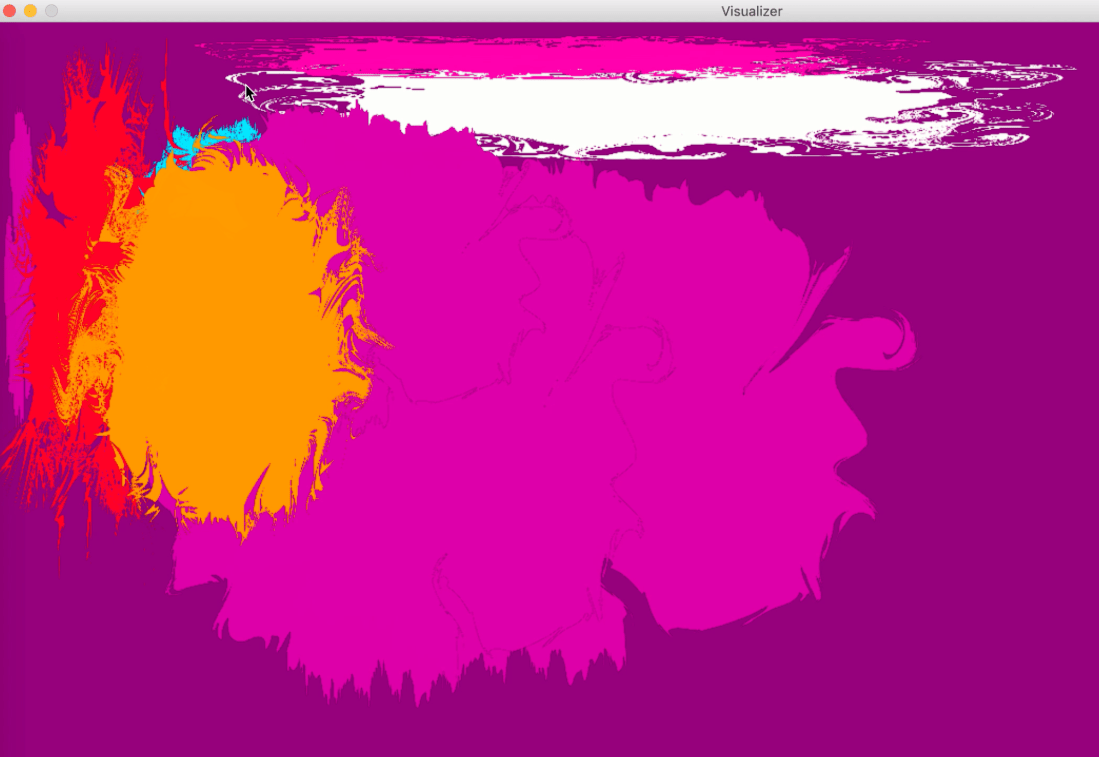
This code does everything we want it to do,  now it’s just time to refine our final project into something we’re excited to present. Currently, the visualizer looks like this:

Screen Shot 2018-12-10 at 3.04.12 PM.png

The color splashes get added (different shapes and colors depending on the note) when the keyboard is played, and the gradient in the background transitions between blue and red. These next few days we are going to be putting the finishing touches on the project by creating a “clear” function, changing the way the timer works so it hopefully is less buggy, and trying to get the color splashes to animate by rotating. We are meeting tomorrow to hopefully get these finishing touches worked out!


Questions for Lab


I think it’s safe to say that the biggest hurdle in getting our final project up and running at this point is understanding how the Jython Environment for Music works. Since we’ve been using JES this whole semester, it is slightly daunting not having the safe functions available to us as we did before. For the lab, we could use help understanding how to import midi files and how to get information out of them using JEM. We could also use help in starting to set up a dictionary of note values so that we can assign different visuals to them.


Project Introduction


Artist’s statement:

As an avid concert go-er and music listener, I speak from my personal preference to say that music is more enjoyable when there are synchronous motion graphics. The problem is that most music listeners do not have access to professional software that does this. Our program will be simple, user friendly, and allow music listeners to have a concert like experience on demand. As waveform analysis seems to be a quite daunting task, our program will run off of midi files. While the user will not be able to chose any mp3 file, the use of midi files will allow our program to be precise with note and beat alignment.

Our program will consist of 2 displays. One being the main display which will show the motion graphics, and the other being the control panel. The control panel will be a simple display with several options that will modify the graphics as well as a play and pause button.

Work schedule:

We plan to meet up at 1 p.m. on Thursdays, for 2 hours, and again on the weekends if necessary.

What we need to learn:

While some understanding of how midi files work will be necessary, a bulk of the work of this project will depend on learning how to use Jython Environment for Music. This is necessary for the use of midi files and playback. Additionally, we will need to better our understanding of graphics and how to make them change size, color, etc in a smooth and pleasing manner.

Our Team Members:

  • Calvin Ritger
  • Owen Grace
  • Sidd Nair
  • Tenny McFarlane

Tenny and I have some experience in with music production and processing; we will be able to teach Sidd and Calvin on this aspect of the project. We will all have learning to do on the rest of the code.


Stay Tuned!