We all spent this weekend working on different aspects of the project and had time to reconvene during class and combine our code into a final product. This code combines my shapes that get called by midi notes played on a keyboard,
This file contains hidden or bidirectional Unicode text that may be interpreted or compiled differently than what appears below. To review, open the file in an editor that reveals hidden Unicode characters.
Learn more about bidirectional Unicode characters
| def drawShape(eventType, channel, data1, data2): | |
| global window, shape1, shape2, shape3, shape4, shape5, shape6 | |
| # iicon position is random | |
| x = randint(0, getScreenWidth()) # x may be anywhere on display | |
| y = randint(0, getScreenHeight()) # y may be anywhere on display | |
| colors = ["Red", "Orange", "Yellow", "Green", "Blue", "Purple", "Pink", "White", "Teal"] | |
| colorIdx = (data1 / 2) % len(colors) | |
| color = colors[colorIdx] | |
| shapeLists = [shape1, shape2, shape3, shape4, shape5, shape6] | |
| shapeListIdx = (data1 / 3) % len(shapeLists) | |
| shapeList = shapeLists[shapeListIdx] | |
| shape = shapeList[color] | |
| icon = Icon(shape,x,y) | |
| window.add(icon) | |
| # play note | |
| Play.noteOn(data1, data2) | |
| # establish a connection to an input MIDI device | |
| midiIn = MidiIn("Unknown Vendor Oxygen 25") | |
| # register a callback function to process incoming MIDI events | |
| midiIn.onNoteOn(drawShape) |
Owen’s color gradient background,
This file contains hidden or bidirectional Unicode text that may be interpreted or compiled differently than what appears below. To review, open the file in an editor that reveals hidden Unicode characters.
Learn more about bidirectional Unicode characters
| from gui import * | |
| from timer import * | |
| import time | |
| b = True | |
| def updateColor(shape): | |
| while b: | |
| for count in range(0,3): | |
| #From red (255,0,0) to blue (0,0,255) | |
| for i in range(0,255): | |
| red = 255 – i | |
| green = 0 | |
| blue = i | |
| color = Color(red,green,blue) | |
| shape.setColor(color) | |
| time.sleep(0.01) | |
| if color == Color(1,0,254): | |
| #From blue (0,0,255) to red (255,0,0) | |
| for i in range(0,255): | |
| red = i | |
| green = 0 | |
| blue = 255 – i | |
| color = Color(red,green,blue) | |
| shape.setColor(color) | |
| time.sleep(0.01) | |
and Tenny’s setup funciton.
This file contains hidden or bidirectional Unicode text that may be interpreted or compiled differently than what appears below. To review, open the file in an editor that reveals hidden Unicode characters.
Learn more about bidirectional Unicode characters
| def setUp(): | |
| global window | |
| window = Display("Visualizer", getScreenWidth(), getScreenHeight()) | |
| gradient = Rectangle(0, 0, getScreenWidth(), getScreenHeight(), Color.BLACK, True, 1) | |
| window.add(gradient) | |
| updateColor(gradient) | |
| #input: None | |
| #return: the width of the screen | |
| def getScreenWidth(): | |
| return Toolkit.getDefaultToolkit().getScreenSize().width | |
| #input: none | |
| #return: the height of the screen | |
| def getScreenHeight(): | |
| return Toolkit.getDefaultToolkit().getScreenSize().height | |
This code does everything we want it to do, now it’s just time to refine our final project into something we’re excited to present. Currently, the visualizer looks like this:
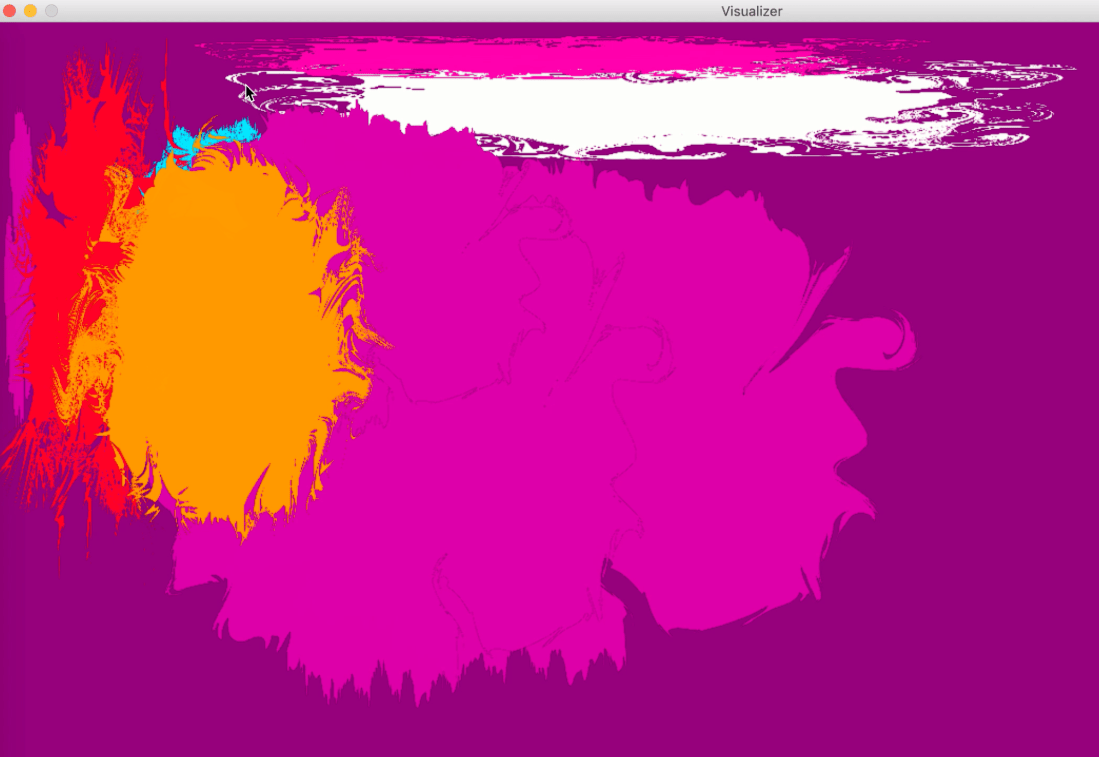
The color splashes get added (different shapes and colors depending on the note) when the keyboard is played, and the gradient in the background transitions between blue and red. These next few days we are going to be putting the finishing touches on the project by creating a “clear” function, changing the way the timer works so it hopefully is less buggy, and trying to get the color splashes to animate by rotating. We are meeting tomorrow to hopefully get these finishing touches worked out!

 MIDI Music Visualization In Python